Tool: Markdown Tool 📝
The Markdown Tool is a specialized node for providing structured text content to your workflows. It allows you to pre-configure a document written in Markdown format (.md), making it an excellent choice for providing formatted instructions, reports, or knowledge bases to an Ai Agent.
How It Works
Similar to the PDF Tool, you pre-configure the Markdown Tool in the editor by attaching a specific .md file. When the workflow runs, the tool reads the content of this file and passes it to the next node. The key advantage is that an Ai Agent can understand the structure of the Markdown (like headings, lists, and tables) for more organized analysis and output.
Setup & Configuration
-
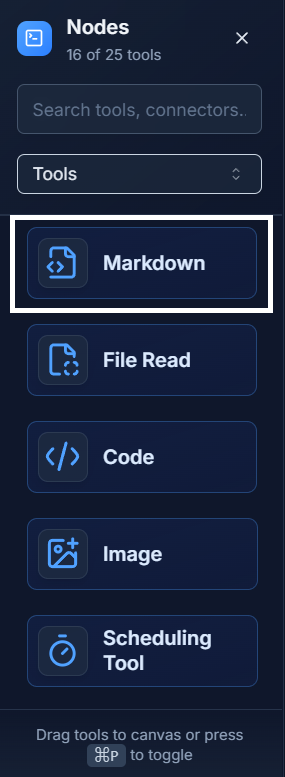
Add the Tool: Drag the Markdown Tool from the Tools panel onto your canvas.
-
Configure It: Double-click the node to open its settings. You can either:
- Write Directly: Type or paste your Markdown content directly into the text editor.
- Attach File: Drag and drop a
.mdfile into the settings panel.
-
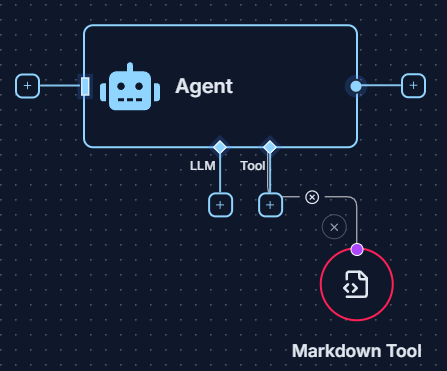
Connect It: Connect the output of the Markdown Tool to the
Toolinput socket of an Ai Agent. This gives the agent the "skill" to read and understand this specific Markdown document.
Example: Generating a Report from Structured Data 💡
Imagine you have a template for a weekly report written in Markdown, with placeholders for key metrics. You can use an Ai Agent to fill out this template.
-
Create the Template: In a Markdown Tool, create a report template like this:
# Weekly Sales Report

## Summary
- **Total Sales:** [AGENT_FILL_DATA]
- **Top Performing Product:** [AGENT_FILL_DATA]

## Key Insights
[AGENT_FILL_INSIGHTS] -
Gather Data: Use other tools (like a Database Tool or Web Tool) to get the latest sales figures.
-
Connect to the Agent:
- Connect the Markdown Tool (with the template) to the
Toolinput of an Ai Agent. - Connect the data-gathering tools to the main input of the Ai Agent.
- Connect the Markdown Tool (with the template) to the
-
Instruct the Agent: In the Start Node, give the agent a prompt: "Using the provided data, fill out the weekly sales report template from the Markdown Tool."
The agent will then generate a complete report by replacing the placeholders with the real data, respecting the original Markdown formatting.
Quick Tips
- Structured Knowledge: Use the Markdown Tool when the structure of your document (headings, lists, etc.) is important for the Ai Agent's task.
- Report Templates: This tool is perfect for creating and filling out structured report templates.
- Static Content: Like the PDF and Text tools, the Markdown tool is for static content that you configure before running the workflow. For dynamic, user-provided files, use the Upload Tool.